
Launching soon on Uneed ↗
Local-first AI for builders · v5.4 · MIT

Local-first AI agent for your terminal & browser.

Stop context-switching between your editor, browser, and five chatbot tabs to finish one task.

Chusquis puts your repo, tools, memory, and 131 integrations in one chat that shows its work — and asks before anything risky.

In plain terms: a chat assistant that lives in your terminal, reads your files, searches the web, and does chores across your tools — explaining each step as it goes.

GitHub ↗
$python -m pip install hellochusquis
$hellochusquis --quick
→ 6 files inspected · 1 approval requested
✓done · memory updated · audit written
452 tests passing
131 tool integrations
100% local-first by default
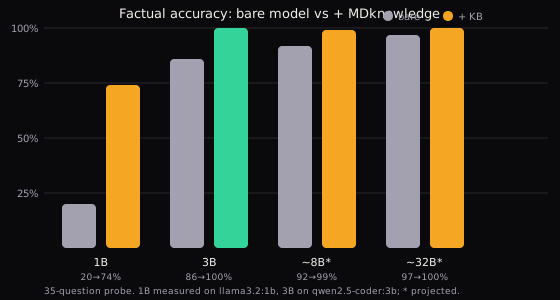
Knowledge accuracy: local 3B model from 86 to 100 percent on a 35-question probe
Proof

Measured: 86% → 100% recall, 64s → 0.5s ingest.

A 1200+ file knowledge layer (~9900 facts) lifts a local 3B model from 86% to 100% on a 35-question factual probe, and the same recall path scores 35/35 retrieval coverage offline — receipts and methodology. v5.2 cut KB ingest from 64s to 0.5s — and 452 passing tests guard every release.

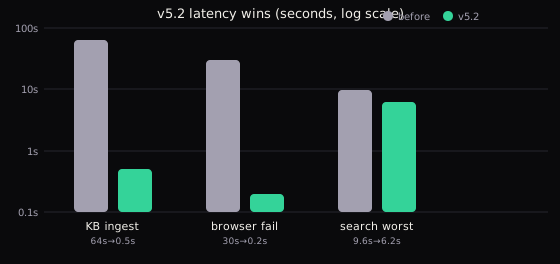
Methodology: a 35-question factual probe against a local 3B model (qwen2.5-coder:3b), bare versus knowledge-layered. Retrieval coverage went from 0% to 97%; accuracy from 86% to 100%. Latency wins measured on KB ingest, browser failure recovery, and worst-case search before and after v5.2.

  • Retrieval coverage that stays useful in real work
  • Explainable tool calls rather than opaque black-box behavior
  • Local-first defaults that keep credentials and context in your control
Latency · v5.2 wins: KB ingest 64s→0.5s
Latency: KB ingest 64s to 0.5s, browser fail 30s to 0.2s, search worst 9.6s to 6.2s
One agent, four surfaces
terminal web api telegram

Every turn searchable · every tool call visible · every boundary clear.

Why it works

One chat for code, tools, and context.

01

Work beside your code

Search repos, inspect files, run bounded shell tasks, and plan multi-step work with /plan — without leaving the agent. Tool calls stream visibly, so a research task like "find the riskiest test gap" shows its files, commands, and findings instead of hiding them.

02

Connect the tools you trust

GitHub, Slack, Docker, Notion, AWS, Stripe, Postgres, and 120+ more — high-impact actions wait for your approval. Sessions stay isolated per caller, credentials stay redacted in audit logs, and roles (viewer, operator, owner) decide who can chat, approve, or manage runtime.

03

Keep context useful

SQLite-backed memory, sessions, summaries, and per-turn recall stay local — no transcript dump in every prompt. Say remember to pin a fact, forget to drop one, and let the 1200-file knowledge layer lift factual recall on every turn.

Workflow

From a single prompt to a safe, visible result.

Plan, execute, and review in one place. Sessions stay isolated, requests stay bounded, credentials stay protected.

Command execution Web access File management Approval gates
hellochusquis · local● live
$ hellochusquis
search latest Python release — summarized
→ 6 files inspected · 1 issue found · approval requested
✓ done · memory updated · audit written
Use cases

Tuesday work, handled.

Six jobs developers actually do, each one a single prompt away — guarded by 452 automated checks that run before every release, so updates never break your workflow. Never touched a terminal? Start in the web UI or Telegram instead: same agent, no commands required.

Ship the scary code review

Point Chusquis at an unfamiliar repo and ask for the riskiest gap. It maps the project, traces the highest-impact paths, and reports findings with file names — then waits for your approval before touching anything.

/plan find the riskiest test gap

Brief yourself in minutes

Ask for the latest release notes, advisories, or docs across the web and get a summary back in chat. Search and browser tools do the legwork; bounded shell commands verify claims against your local checkout.

summarize what changed upstream

Triage inbox and chat

Gmail, Slack, and Discord integrations pull threads into one place. Draft replies, file follow-ups, and ping allowlisted Telegram chats — every external write pauses at the approval gate first.

draft replies for unread threads

Run boring ops safely

Docker, Kubernetes, Postgres, Terraform, and AWS tasks run through the same chat with the same guardrails. Isolated sessions keep one operator's state away from another's, and every decision lands in the audit log.

check staging health, then report

Remember everything

Say remember to pin a decision and forget to drop it. Sessions, summaries, and learnings persist in local SQLite, and the most relevant turns are recalled into context automatically before each answer.

remember we deploy on Fridays

Talk from anywhere

Start in the terminal, continue from the web UI on port 7272, automate over the REST API with streaming responses, or chat from Telegram. One agent, four surfaces, same memory everywhere.

hellochusquis web
Install

Up and running in three steps.

1 · Install · Python 3.10+
python -m pip install hellochusquis
2 · Configure
hellochusquis config
3 · Chat · Web · API
hellochusquis · web · api
FAQ

Questions, answered straight.

Is this an open-source local AI agent for the terminal?

Yes. HelloChusquis is MIT licensed, runs locally, and starts in your terminal with hellochusquis after python -m pip install hellochusquis. Your code, keys, and memory stay on your machine; only the model calls you configure ever leave it.

How do I install and start?

Run python -m pip install hellochusquis (Python 3.10+), then hellochusquis config to set up a provider, then hellochusquis to chat. Prefer a UI? hellochusquis web serves a local workspace on port 7272.

Which AI providers work?

Any OpenAI-compatible endpoint plus configured hosted and local providers, managed through one setup flow. Keys live in your local setup store or environment variables — never in the repo. Run hellochusquis doctor --contracts for offline diagnostics.

Where does my data live?

On your machine. Memory, sessions, audit records, and config sit under ~/.hellochusquis in SQLite stores. The web UI creates a local access key on first launch; every chat turn is saved, searchable, and recallable per turn.

Is it safe to let it run commands?

High-impact operations — shell execution, file mutation, external writes, browser submissions — can pause for your approval before dispatch. HTTP sessions are isolated per caller, approval records are audit-logged with secrets redacted, and named roles control who may chat, approve, or administer.

What does it cost? What license?

HelloChusquis v5.4 is MIT licensed and free. You only pay your model provider, if anything — local models cost nothing beyond your hardware. 452 tests guard every release.

Which surfaces can I work from?

Four, sharing one memory. The terminal (hellochusquis) for interactive work, the web UI (hellochusquis web, port 7272) for streaming chat with voice and themes, the REST API (hellochusquis api --port 8080) for automation with server-sent events, and Telegram for allowlisted chats on the go.